

Do you wonder what OnlyFans users see when they visit your profile? Or do you want to know the significance of maintaining a professional profile appearance on OnlyFans? If yes, you have landed on the right page.
OnlyFans is a massively profitable platform for creators who pay attention to detail and give their best. Whether selecting your profile’s display name or setting a subscription price, everything requires a calculative and precise approach.
In this blog, we have discussed the information that is accessible to your fans and how you can make it engaging. Moreover, we have also shared OnlyFans privacy protocols and the information that is kept hidden from your fans. So, what are you waiting for? Scroll down to find out.
What Information Do Fans See On Your OnlyFans Seller Profile? | Is It Important To Know?
OnlyFans is rapidly emerging as a multi-million adult content monetization platform where creators globally are making their fortune. However, since the competition is so high, success on OnlyFans does not come hand in hand. As a creator, you must go above and beyond to gain the limelight and get traction on your seller profile.
Therefore, in order to maximize the effectiveness of your efforts to succeed on OnlyFans, you must put yourself in your fan’s shoes and analyze your profile from their perspective. Doing so can help you improve your performance and identify any hindering factors in your OnlyFans account. Moreover, viewing your profile from a subscriber’s POV can also help you give your profile a professional look.
Conclusively, there are several benefits of evaluating your OnlyFans profile regularly. So, are you ready to see your OnlyFans profile’s appearance from your fan’s perspective? If yes, continue reading.
Sell Feet Pics on FeetFinder:
FeetFinder is the No.1 platform for anyone interested to sell feet pics and make money. On FeetFinder, you can make money by getting paying subscribers, selling albums, receive a tip, and getting custom content offers.
The best thing about FeetFinder is that you can see the list of all the buyers and can reach out to them to let them buy content from you.
They have over 1 Million creators on the platform and have paid millions of dollars to these creator just this year.
Do you want to make money? Sell Feet Pics on FeetFinder here.
The 7 Primary Things That a Fan Sees on a Creator Account
Now that we have evaluated the significance of seeing your profile from your fanbase’s point of view, let us tell you how to maximize your profile’s effectiveness with these factors. Below is a list of factors that influence the overview of your OnlyFans seller profile:
1. OnlyFans Username or Display Name
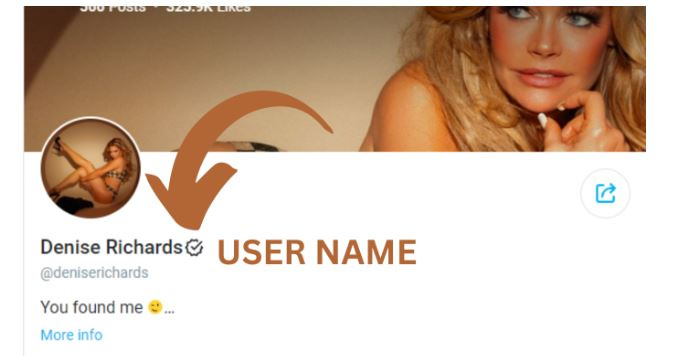
When you see or meet someone attractive, what is the first thing you want to know about them? Their name, of course. The same happens on your OnlyFans profile, meaning the first thing a potential fan notices about you is your username. Although it depends on you whether or not to share your real name with your OnlyFans audience, whatever you put in that “display name” option must be impressive and relevant.
If you want to stay anonymous on OnlyFans, the platform offers you to use a stage name. However, choosing a stage name that accurately reflects your personality and content is necessary. By selecting a relevant username, you can make it easy for your fans to understand the content type you produce and connect with you immediately. For example, if you are a MILF, consider using a relevant display name like MiaMILF, MilkyMommy, MomNextDoor, etc.
2. OnlyFans Display and Cover Image
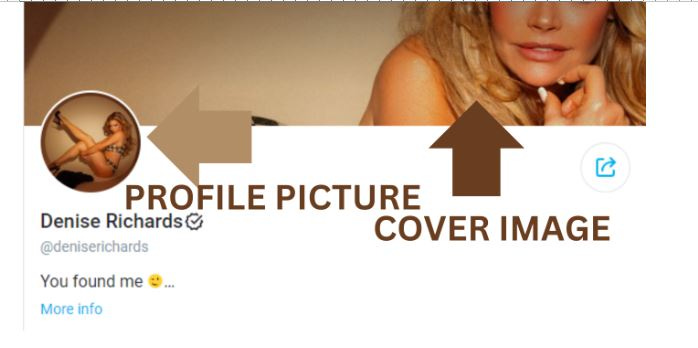
Soon after viewing your OnlyFans display name, the next thing a potential subscriber would want to see is “you.” For this, OnlyFans has a profile and cover picture option where you can upload your attractive images. Like your OnlyFans username, your profile image must represent your content niches and specializations. For example, if you are a foot fetish model, upload a profile picture that showcases the beauty of your pretty feet.
Moreover, remember that if you have a paid account, your profile and cover image are the only free-to-view content that a fan can view on your account. Therefore, remember to give your best shot and upload the most attractive image in the profile picture option. If you maintain anonymity as an OnlyFans creator, use a profile and cover picture that does not show your face or other identifiable features.
3. OnlyFans “About Me” or Bio Section
Another prominent and noticeable factor about your OnlyFans profile is the “About Me” section. Before a fan hits the “Subscriber Now” option, they want to know about your content, personality, content flow, interests, and more. As a result, it is critical for an OnlyFans creator to design a bio that is informative, engaging, and interactive.
Moreover, a well-written bio can give your OnlyFans profile a legitimate and professional look. On the other hand, a creator profile with no bio often leads to missing user interests. Below is a list of factors you must take care of when writing the “About Me” section of your OnlyFans profile:
Delivers Information: You must not miss the primary purpose of writing an OnlyFans bio: delivering your message to potential fans. Therefore, ensure that your OnlyFans bio contains the maximum and mandatory information about your content niches, posting schedules, fan interactions, etc.
Brief and Direct: Once you have decided on the information you will share in your OnlyFans bio, ensure it is direct and brief. Remember that no one would want to read tales in an OnlyFans creator’s bio section, so the shorter, the better. Moreover, do not add unnecessary information that will not help or interest the viewers.
Focus on Readability: When writing an OnlyFans bio, consider using easy-to-understand vocabulary, writing short sentences, and leaving white space between paragraphs to improve the readability of the text. Your OnlyFans bio must be well-communicated and understandable.
Maintain Tone: If you are an adult creator, you must maintain a naughty and flirting tone in your OnlyFans bio. You can include emotions in your text by placing emojis or starting the bio with a witty joke. However, remember that your humor must not offend the readers.
Be Honest: Regardless of whether you are sharing your services, the content flow, or your availability, you must provide honest information to your readers. Including anything you would not be able to offer will only result in losing the interest of your subscribers.
4. Monthly Subscription Prices or Bundles
Once a potential buyer has seen your username, profile pictures, and “About Me” section, the next thing they would be interested in is your subscription charges. Although it may attract you to set up higher subscription costs, we suggest you reconsider. Remember, the higher your monthly subscription charges are, the lower your chances of gaining more subscribers.
Did you know that most of the top OnlyFans creators have a free-to-view profile, and many have minimalistic subscription charges? It is because once you have gained new subscribers, you can make money through the platform’s other revenue streams. For example, you can set PPV content, take custom orders, and offer personalized services in exchange for sexual services.
Considering these factors, we recommend you set reasonable subscription prices for your OnlyFans profile. Moreover, OnlyFans allows you to offer bundle offers, too. Therefore, you can propose a three-month, six-month, or yearly subscription bundle to your interested fans.
5. Number of Posted Images, Videos, and Likes
Did you know that fans can also see the number of content pieces you have posted and likes received on your OnlyFans profile? If not, well, now you do. Having a higher number of posts and likes helps creators win the trust of potential subscribers and increase the chances of traction on their profiles. If you do not want to share these features with your OnlyFans audience, you can customize them through your profile’s settings.
6. Social Media Account Links
If OnlyFans creators want to give the users an overlook of their primarily produced content, they can share their social media account links on the OnlyFans seller profile. Sharing your social media profiles is an excellent method to prove your legitimacy to interested fans and maximize your chances of gaining new subscribers.
All you need to do is add your social media account links in your profile’s “About Me” section. OnlyFans allows you to share the links of all major social media platforms, like Instagram, Twitter, Snapchat, TikTok, YouTube, etc.
7. Last Seen or Activity Status
If you use your OnlyFans profile actively, consider sharing your activity status with the audience. Potential fans tend to show more interest in the profiles with their activity status available. However, you can turn off the availability settings of your OnlyFans profile based on your preferences.
What Does A Fan Cannot See on Your Profile? | OnlyFans Privacy Protocols
OnlyFans is a secure venture that ensures maintaining your privacy. Thus, the platform safeguards any private information that is sensitive and could lead to a privacy violation. The following information is kept confidential by OnlyFans, and your fans cannot see it:
1. Your Real Name
Although you must provide your real name in order to create a seller profile on OnlyFans, the platform keeps it hidden, and your fans cannot see it. However, if you do not mind sharing your real name with your subscribers, simply add it to your OnlyFans profile’s display name.
2. Bank Account Details
OnlyFans creators provide their bank account details in order to receive their payments. However, this confidential data is highly protected and is not shared with your fans.
3. Any Personal Contact Information
For creating an OnlyFans profile, buyers and sellers must submit their personal information, such as their email address, phone number, DOB (date of birth), or a government-issued ID card. The platform protects all sensitive data and ensures no one accesses it. Moreover, OnlyFans restricts the fans and creators from sharing their personal information in private chats to ensure privacy protection.
4. Current Location
Fortunately, buyers and creators can control the location visibility on their OnlyFans profile. As a result, if you are an anonymous creator, consider going into the settings of your OnlyFans account and turning off the location visibility option.
P.S. What Information Fans Can See On OnlyFans? | A Detailed Guide
As an OnlyFans creator, you must pay close attention to every detail of your profile in order to avoid any loose ends. From selecting a username for your profile to writing a bio and uploading a profile picture, everything must get done accurately to ensure your professional appearance on the platform. Moreover, OnlyFans profiles are customizable, and creators can determine whether or not they want to share their location, social media accounts, or activity status with their fans.
We sincerely hope this detailed guide has helped you understand everything you wanted to know about your OnlyFans profile’s appearance and how the platform protects user privacy.